1970s Film Look AI Prompts: 4 Warm Analog Scenes and the Film Traits Behind Them
- • Introduction
- • What Actually Makes a Photo Look Like the 1970s
- • Film Terms in These Prompts, and What They Do
- • ChatGPT, Gemini or Bing Image Creator?
- • Step-by-Step: How to Use These Prompts
- • Prompt 1: 1970s Summer Convertible Road Trip with Film Grain
- • Prompt 2: Vintage Vinyl Record Store Nostalgia Portrait
- • Prompt 3: Sun-Kissed Retro Beachside Boardwalk with Roller Skates
- • Prompt 4: Cozy 1970s Diner Booth Conversation over Milkshakes
- • Giving Your Own Photo the 1970s Treatment
- • Problems & Fixes
- • Pro Tips
- • Frequently Asked Questions
AI image tools start from a clean, sharp, evenly lit picture. A family photo printed in 1975 is the opposite: warm drifting colour, soft shadows, and a glow around bright sky or chrome. Type only "1970s photo" and the tool usually changes the clothes but keeps the modern polish.
This guide treats the decade as physical traits you can name: film colour, grain, the way highlights spread, soft lenses, and how prints aged in albums. Once you know which word controls which trait, you can push a scene further into the period or pull it back.
Three of the four prompts below have an AI-generated sample made from them. The samples were created when the prompts still named film brands; those names are now replaced with plain descriptions of the same look. The record-store sample was removed because the tool filled the background with real band posters.
What Actually Makes a Photo Look Like the 1970s
Colour snapshots became normal for ordinary families in the 1970s. Early in the decade Kodak introduced Kodacolor II, its first colour-negative film for the C-41 process, and the faster Kodacolor 400 was on sale by 1977. Consumer film of the time had more visible grain and looser colour than today's stocks.
The orange-red look people link with the decade is partly an effect of age. Colour prints are made of cyan, magenta and yellow dyes, and in many prints of that era the cyan faded fastest, even inside closed albums, so pictures drifted towards red and yellow. A prompt that asks for "faded" colour is really asking the AI to copy decades of ageing.
- •Colour cast: warm amber, creamy highlights, weak cyan in sky and shadows
- •Grain: an even, random speckle, stronger on fast film
- •Halation: a soft orange-red glow around the brightest points
- •Props: earth-tone clothes (mustard, rust, olive), flared trousers, wide collars, wood panelling
Film Terms in These Prompts, and What They Do
Grain: film records light in tiny crystals that leave a random speckle after developing. Fast film such as ISO 400 is grainier than slow film such as ISO 64. "Visible organic film grain" asks for an obvious speckle; "fine film grain" keeps it subtle.
Halation: strong light passes through the film, bounces off its back and exposes the image again around the highlight, leaving a warm glow. Most films include a layer that limits this, so "soft lens halation" is the right strength for a believable result.
Slide film versus negative: Kodachrome, a slide film made from 1935 to 2009, is remembered for strong reds and blues and deep shadows. Kodak Portra, which many online prompts use for "70s skin tones", only arrived in 1998, so it is a modern look borrowed for the period. That is why these prompts describe looks rather than products.
ChatGPT, Gemini or Bing Image Creator?
All three create new images from these prompts. ChatGPT and Gemini are chat-based, so you can reply "same image, stronger grain, warmer colour" instead of rewriting, which suits a look where the right amount of fade is a matter of taste.
Bing Image Creator is free with a personal Microsoft account and gives 15 fast creations a day, then continues at standard speed. Its model menu changes over time, so if one model ignores the grain or border wording, try another. Bing adds a small watermark in the bottom-left corner.
Step-by-Step: How to Use These Prompts
- 1Pick a prompt, make any swaps from its 'Make it yours' list, then tap 'Copy Prompt'.
- 2ChatGPT: open chatgpt.com, paste the prompt into a new chat and send. Set the shape with the aspect-ratio option or by writing it in the prompt, such as 'vertical 9:16'.
- 3Gemini: open gemini.google.com, sign in and begin with 'Create an image of' followed by the prompt.
- 4Bing Image Creator: go to bing.com/create with a personal Microsoft account (work and school accounts are not supported), paste the prompt, then choose a model and shape.
- 5Check three things: colour cast, grain level and the face. Change one phrase at a time so you can see which word made the difference. Free-plan limits change, so refine rather than regenerate.
4 Copy-Ready 1970s Film Prompts
Copy a prompt, then use the button to open the tool it was written for.
Prompt 1: 1970s Summer Convertible Road Trip with Film Grain
Written for: ChatGPT / Gemini / Bing Image Creator
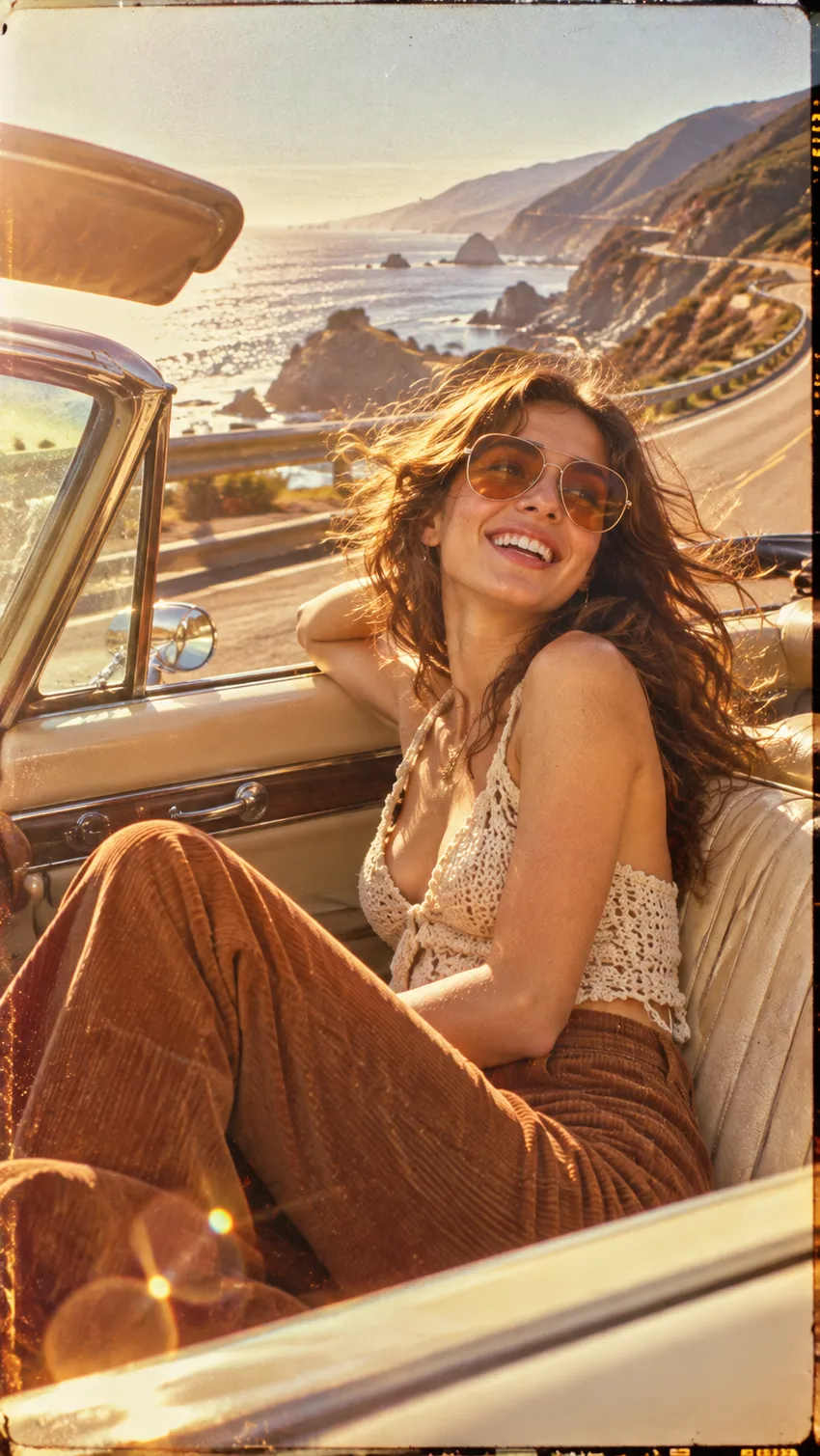
An authentic vintage 1970s candid color photograph of a carefree young woman laughing in the passenger seat of an open-top vintage cream-colored convertible driving down coastal Highway 1. Wearing oversized amber-tinted aviator sunglasses, a crochet knit top, and high-waisted flared corduroy pants. Golden summer sun flaring through windblown hair, warm portrait color-negative film tones, visible organic film grain, soft lens halation, 8k resolution.
Why this prompt works
"Candid" and "laughing" turn a posed fashion shot into a snapshot. "Golden summer sun flaring through windblown hair" places a low sun behind her, creating the bright hair rim and the flare spots in the sample. "Warm portrait color-negative film tones", "visible organic film grain" and "soft lens halation" name three separate film traits, leaving the tool little room to fall back to a clean digital finish.
Make it yours
- •Boy: change 'a carefree young woman' to 'a carefree young man' and the crochet top to 'an open-collar printed shirt'. Light and film look stay the same.
- •Couple: write 'a young couple laughing in the front seats, one driving' and drop 'in the passenger seat', so nobody gets squeezed into one seat.
- •India: replace 'coastal Highway 1' with 'a coastal road in Goa lined with coconut palms'.
- •Colour: change 'cream-colored' to 'mustard yellow'. The car is the largest coloured shape, so it sets the palette.
Prompt 2: Vintage Vinyl Record Store Nostalgia Portrait
Written for: ChatGPT / Gemini / Bing Image Creator
Candid retro 1970s snapshot of a handsome young man browsing classic vinyl records in a cozy, sunlit wooden record store. Holding an illustrated record sleeve with a smile, wearing a vintage striped ringer t-shirt and wide-leg jeans. Afternoon dust motes dancing in sunbeams filtering through the store window, warm sepia undertones, 35mm film aesthetic, authentic retro nostalgia, 8k.
Why this prompt works
"Dust motes dancing in sunbeams filtering through the store window" gives one strong side light, which makes the light shafts and warm haze. "Warm sepia undertones" pulls wood, skin and sleeves into one brown-orange palette. "Striped ringer t-shirt and wide-leg jeans" are specific period clothes; 'retro outfit' alone gives generic modern clothing. The sample invented posters with real band names, a common problem fixed in the table below.
Make it yours
- •Girl: write 'a young woman with long centre-parted hair' and 'a flared denim skirt'. Centre-parted hair is a strong 1970s cue.
- •India: replace the store with 'an old music shop in a busy market lane, records and radios on wooden shelves'.
- •Cooler print: swap 'warm sepia undertones' for 'muted olive and brown tones, slightly faded'.
- •Profile picture: replace 'browsing classic vinyl records' with 'holding a record sleeve near his chest, half-length portrait'.
Prompt 3: Sun-Kissed Retro Beachside Boardwalk with Roller Skates
Written for: ChatGPT / Gemini / Bing Image Creator
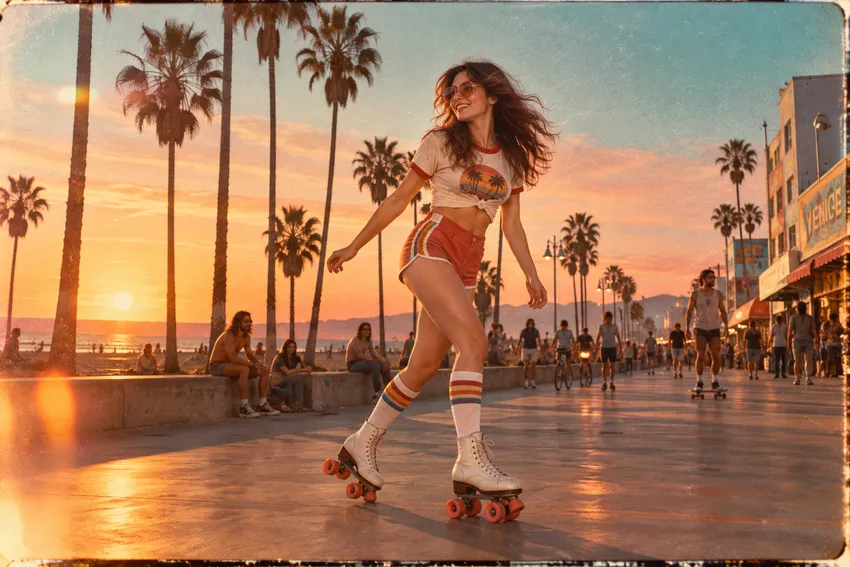
A wide cinematic retro 1970s photograph of a girl gliding on four-wheel quad roller skates along the Venice Beach boardwalk. Palm trees silhouetted against a pastel peach and turquoise sunset sky, wearing retro striped knee-high tube socks and colorful vintage shorts. Soft analog lens flare, gentle motion blur on the wheels, faded instant-film color saturation, 8k.
Why this prompt works
"Gentle motion blur on the wheels" keeps blur on the fastest part so the face stays sharp. "Palm trees silhouetted against a pastel peach and turquoise sunset sky" sets a backlit, two-colour palette. "Faded instant-film color saturation" lowers contrast, and in the sample the tool also added a worn border and burnt edges, a common AI reading of old film.
Make it yours
- •Boy: change 'a girl' to 'a young man' and the shorts to 'retro gym shorts and a ringer tee'.
- •India: replace the boardwalk with 'the seafront promenade at Marine Drive, Mumbai'; the sea wall and city lights replace the palms.
- •Instant-print frame: add 'square instant photo with a thick white border, wider at the bottom' and use 1:1. Some tools skip borders.
- •Cleaner background: add 'empty boardwalk, no other people'.
Prompt 4: Cozy 1970s Diner Booth Conversation over Milkshakes
Written for: ChatGPT / Gemini / Bing Image Creator
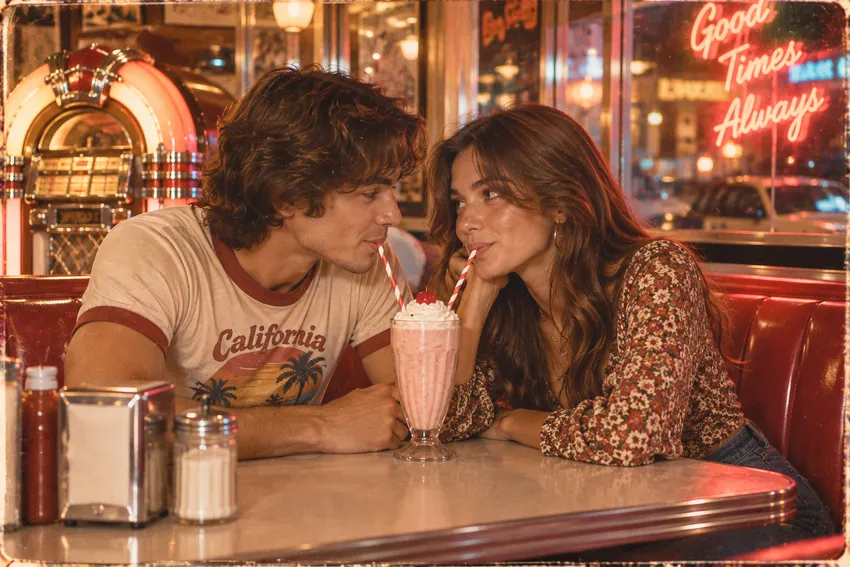
Warm intimate 1970s photograph of two friends sharing a strawberry milkshake with two striped paper straws inside a retro red vinyl booth diner. Chrome jukebox glowing in the background, neon sign softly reflecting in the window glass. Warm analog film softness, subtle vignetting at the corners, authentic vintage slide-film color palette, nostalgic 8k photo.
Why this prompt works
Two light sources, the "chrome jukebox glowing" and the "neon sign softly reflecting", mix warm and coloured light, giving the faces their pink-red cast. "Subtle vignetting at the corners" darkens the edges like an older lens, and "warm analog film softness" lowers sharpness. The tool read 'two friends' as a young man and woman, so say who the pair are if you want otherwise.
Make it yours
- •Same-gender friends: write 'two college friends, both young women' or 'two brothers'.
- •India: replace the diner with 'an old Irani café with marble-top tables and bentwood chairs' and the milkshake with 'two glasses of cutting chai'.
- •More 1970s palette: change 'red vinyl booth' to 'mustard and brown vinyl booth'; red booths and chrome often suggest the 1950s.
- •Sign text: write 'a neon sign reading OPEN' or 'a neon sign without text'. Tools invent sign words and often misspell them.
Giving Your Own Photo the 1970s Treatment
To put yourself in the picture, upload a photo to ChatGPT or Gemini and ask for an edit. Use only photos of yourself or of people who agreed; Google's help pages say editing images in Gemini requires you to be 18 or older.
Sample instruction: "Edit this photo to look like a 1970s colour print from a family album. Keep my face, skin tone, facial features, hairstyle and expression exactly the same. Do not change my body or clothes. Only add warm, slightly faded film colour, fine grain, a soft glow on bright highlights and a gentle dark vignette." If the face shifts, reply "Undo all changes to the face; apply only colour, grain and vignette."
For a matching set, keep the last film phrases of a prompt identical and change only the first sentence (road trip, record shop, café). The images will then look like one roll of film.
Problems & Fixes
| Problem | Fix |
|---|---|
| It looks sharp and glossy, like a phone photo with a filter. | Add 'soft optical focus, no HDR, slightly lifted blacks' and delete '8k' from your copy; it pushes towards crisp digital detail. |
| The clothes look 1970s but the colours look modern. | Name the shift: 'warm amber colour cast, faded cyan, creamy highlights'. 'Vintage' alone rarely changes colour balance. |
| Real band names, logos or car badges appear. | Add 'unbranded, no logos, no readable text on posters, signs or clothing'. |
| Grain is so heavy that faces look blotchy. | Change 'visible organic film grain' to 'fine film grain' and add 'natural skin texture'. |
| In two-person scenes, hands or straws merge. | Place each person separately: 'person on the left holds the glass, person on the right leans on the table'. |
Pro Tips
- •List film traits as separate short phrases (colour cast, grain, halation, vignette); 'vintage filter' leaves the tool guessing.
- •Earth-tone clothes carry the decade even when the film effect is light.
- •Use one clear light source, such as window light or a low sun; flat, even light looks like a modern studio.
Frequently Asked Questions
Do I need to name a film brand such as Kodak or Polaroid?
No. Describing the traits, such as 'warm colour-negative film tones' or 'square instant photo with a white border', gives the tool the same information and lets you adjust each trait separately.
Why does my 1970s image look like the 1950s or 1980s?
Period cues overlap. Chrome and red vinyl suggest the 1950s; bright neon and pastel pink suggest the 1980s. Lean on earth tones, flares, wide collars and warm faded colour.
Does '8k' in the prompt give me a bigger image?
No. Each tool sets its own output size. The word can nudge it towards fine detail, which works against a soft film look, so you can delete it.
Can I post these images or use one as a profile picture?
Personal posting is the usual use, but each tool's terms decide what is allowed, so read them before any commercial use. Remember Bing's corner watermark when you crop.
Sample images on this page are AI-generated. AI tools change often, so results can differ from the samples. See our editorial & AI policy for how guides are written and corrected.